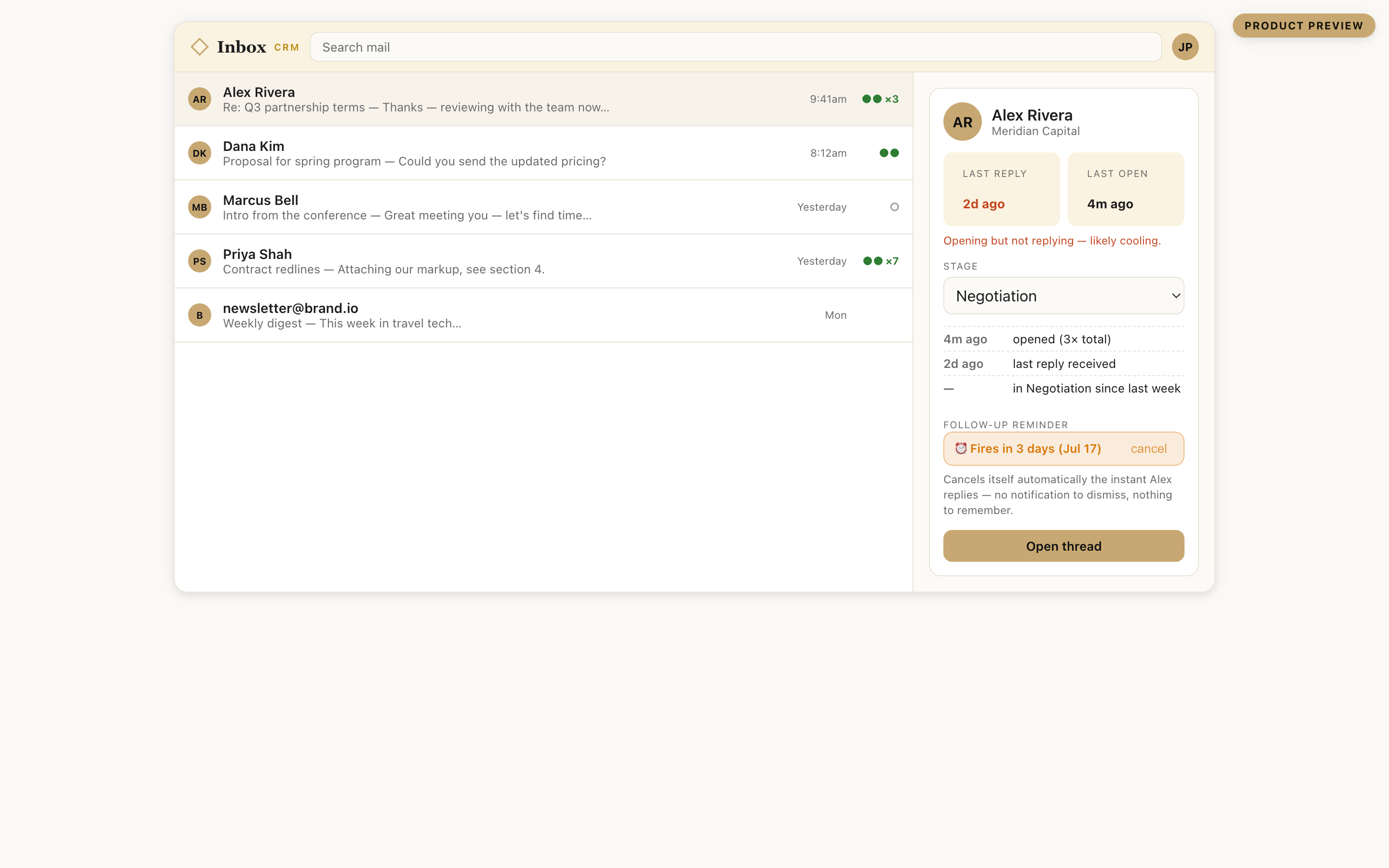
The relationship layer inside Gmail

Give your inbox cachet.

Cachet Inbox tells you who has gone cold and what you promised them, right in the thread you are reading. It reads whether a message actually landed from replies and meetings, not a fake open count, and keeps the warmth layer and the pipeline in one place.

Lives in one Gmail panel · Your mail never routes through our servers · Part of the Cachet suite

The truth about whether it landed.

Apple Mail preloads every tracking pixel before a human sees it, and Gmail proxies and caches the rest. By 2026, most recorded "opens" are structurally unreliable, and the EU now requires consent before a behavioral pixel fires. Cachet Inbox leads with the signals those changes cannot degrade.

The old way
✓✓ Opened 12×
Counts Apple pre-fetches, security scanners, and your own re-reads as real. A confident number with no way to tell what was a person.
Cachet Inbox
Landed: reply in 2 days, meeting booked
Replies and calendar behavior are the primary read, and Apple and Gmail cannot distort them. Filtered opens stay as a clearly labeled secondary hint, never a fake certainty.
Reply detected Meeting booked ☉ Filtered open (secondary)

We tell you the truth about what we cannot see. Pixel opens are disclosed, off by default, and always labeled with their reliability, so you never act on a number that is mostly machines.

Who has gone cold, and what you owe them.

Relationship tools tell you a contact went quiet. Pipeline tools track the deal. No one puts both on the same thread. Cachet Inbox does: the last time you spoke, whether they are cooling, and the next step you committed to, all attached to the box you are already reading.

Going-cold detection

Every contact carries a last-touch date and a warmth read from the mail already flowing. The ones slipping away surface first, so a warm lead never quietly dies.

The pipeline in the thread

A stage and the deal history sit on the Gmail thread itself. No dashboard tab to open, no context lost switching apps.

The commitment you made

A lightweight next-step field on each contact: what you promised, by when. The one thing a pipeline stage never captures.

One brand, one data spine

Card to Contacts to Cal to Inbox.

A business card ecosystem captures the contact and stops. A scheduler books the meeting and stops. Cachet is the whole path as one product, so the person you scan becomes a contact, a booking, and a followed-up relationship without re-typing anything.

Capture

Cachet Card

The first-touch. A card scan or tap becomes a real contact.

Memory

Cachet Contacts

Who they are and how you know them, kept current.

Booking

Cachet Cal

The meeting, without the back-and-forth.

Follow-through

Cachet Inbox

The relationship, warm and answered.You are here

Everything a Gmail CRM should be. Lighter.

The parts a solo advisor, recruiter, or founder actually uses, in one panel, opt-in everywhere.

Honest send signals

Replies and calendar behavior as the primary read, with filtered, disclosed opens as a labeled secondary hint.

Reply queue by warmth

Your day sorted by who is most engaged right now, so the next move is obvious, not buried in time order.

The reminder that cancels itself

Set a follow-up on a thread. The moment they reply, it clears on its own. Nothing to dismiss, nothing to remember.

Mail merge and sequences

Personalized batches with a delivery calendar that respects Gmail's limits. Every step stops the instant somebody replies.

One built-in report

Deal count, reply rate, and cooling threads up top, a stage funnel underneath. The view most people need, nothing to configure.

You are in control

Toggle every surface. Suppress your own opens. No floating bubbles, no pop-ups, no nagging.

Why people switch.

The category splits into pipeline tools with no warmth layer and warmth tools with no pipeline. Cachet Inbox holds both, inside Gmail, at a solo-professional price. Here is the honest picture, including where the others still win.

 Cachet InboxStreakClozeSuperhumanAttio
Warmth layer (who is cooling)
Pipeline / deal recordrents HubSpot
Both in one product
Honest send signal (reply + calendar first)pixel onlypixel onlypixel only
Never auto-merges your contactsforced mergeno dedupe
Solo-professional pricing$49/seat$30–40$44–99/seat
Sanctioned Gmail integrationbuildingDOM injection
MCP + llms.txt for AI agentsbuilding, entry tierfreetop tier onlyBusiness only
From our July 2026 competitor atlas of vendor pages and public reviews. A dash means not offered, or not found in that scan. Where a rival is stronger, the table says so.

What is live today, and what is next.

We would rather show you the real line than a roadmap dressed as a product. This is where the build actually stands.

Live in code today

  • Server-side tracked sends with a real open classifier (real vs Apple prefetch vs bot vs your own re-reads).
  • The pipeline in the thread: pipelines, deal boxes, stages, and notes.
  • Reply queue by engagement, hottest threads first.
  • The self-canceling reminder, one built-in pipeline report, and a fast mobile page.
  • Mail merge with a one-click unsubscribe and a suppression list.
  • Flat tiers enforced in code. Pricing below is real; checkout is not wired yet.
Your contacts are yours, and we never quietly rewrite them.

The best-known relationship tool in this category silently merges contacts and loses data, with no way to turn it off. Cachet Inbox never merges without asking, keeps a full undo, and logs an audit trail of every change. Your data hygiene is a promise, not a setting we hope you never find.

Priced for one relationship-focused professional.

Anchored to what an executive already pays for a beautiful inbox, not to a $10 personal CRM. Start free, upgrade when the relationship layer becomes how you work. Prices shown billed annually.

Free

$0

Forever, no card

  • Inbox context + reply queue
  • Limited tracked sends
  • One pipeline
  • "Powered by Cachet" tag
Get started
Most popular

Pro

$24.99/mo

Billed annually; $34.99 month to month

  • Warmth nudges + pipeline
  • Honest-signal tracking
  • Mail merge + sequences
  • AI drafting + MCP access
Start Pro

Concierge

$59.99/mo

The AI layer across the suite

  • Everything in Pro
  • One price across Cachet
  • Requests get built
  • Priority human help
Talk to us

Business

$39.99/seat

Annual, 3-seat minimum

  • Everything in Pro
  • Scoped sharing
  • Team analytics
  • Roles + priority support
Talk to us
These prices are proposed and still being set; nothing charges yet, and each button opens an email while a live payment account is set up. This page is a private positioning preview built for the Cachet team.

Questions, answered straight.

How is the tracking actually honest?

Opens are approximate by nature: Apple Mail preloads pixels, image proxies cache them, corporate scanners fire them. So Cachet Inbox leads with the signals those cannot fake, whether the recipient replied and whether they booked time with you, and treats the classified, filtered open as a labeled secondary hint. You get the truth, not a fake green checkmark.

What makes it different from Streak or Cloze?

Streak has the pipeline but no warmth layer; Cloze has the warmth layer but no pipeline, and silently merges your contacts. Cachet Inbox holds both, never auto-merges, and prices for one professional rather than a sales team.

Does my mail go through your servers?

No. The panel runs in your browser and shows data for the thread you have open. Sends go through Gmail's own API, signed in as you. Your mailbox is never synced or stored.

Is it built on a sanctioned Google integration?

The server-side send rail already is. We are adding a sanctioned Google Workspace add-on for the in-thread sidebar rather than leaning on the fragile DOM-injection approach the most-installed competitor still uses. We name honestly where each piece stands.

Can an AI assistant read my relationships?

That is the plan, at the entry tier and ungated: an MCP server and a public llms.txt so an agent can see who is cooling and what you committed to. No personal-CRM peer ships one; we are building it as a category first.